Summarize this text with artificial intelligence
Choose your preferred tool to generate a short summary of the text.
In the constantly evolving and changing e-commerce environment, Joom connects sellers with consumers worldwide. This global platform is highly promising, with opportunities that increase businesses' chances of success. However, to stand out in this dynamic marketplace, it is essential to have up-to-date information and strategies.
In this content, we delve deep into the world of Joom. In other words, we detail how you can sell on this platform. Come on, let's examine in detail how you can successfully navigate the Joom e-commerce world!
What is Joom?
The Joom shopping site is a service that connects manufacturers and sellers with global consumers. It is similar to marketplaces like AliExpress and eBay. The platform was established in June 2016.
It allows sellers or manufacturers to move their businesses to new platforms. Thus, new sales channels can be opened with less effort, and orders can be managed directly from the Joom Merchant panel.
How to Use Joom?
Sellers use this platform to reach a global audience and sell their products online. In other words, it offers a service to businesses and individuals where they can list and sell a wide variety of products. So, how do you use the Joom shopping site?
• First, you must start by creating a seller or buyer account.
• Afterwards, you need to complete your profile.
• Then, you can start benefiting from the services.
Is Joom a Reliable Platform?
The answer to whether Joom is reliable or whether Joom.com is reliable is highly anticipated by sellers and consumers alike. This platform can be used by both sellers and consumers with peace of mind. Because it is highly reliable.
Offering various products to consumers, the platform increases seller reputation. It is used by sellers in various parts of the world. On this platform, the majority of sellers try to offer quality products at affordable prices. Of course, reliability can vary from seller to seller.
Which Country is Joom From?
If you are wondering which country Joom belongs to, it is Latvia. It has offices in China, Hong Kong, the United States, Germany, and Luxembourg. At the end of 2022, the platform reported that it moved its headquarters from Riga to Lisbon, Portugal.
Therefore, the company was founded in 2016 in Riga, Latvia. It hosts sellers from all over the world. It is accessible to customers in various countries. In other words, it continues to serve a global customer base.
In Which Countries is Joom Used the Most?
Founded in 2016, Joom is one of the fastest-growing shopping applications in Europe. It is generally used heavily in countries like Ukraine, Germany, France, Moldova, and China.
In addition to the e-commerce platform, it also operates financial technology, logistics, and wholesale trade branches. On the Joom platform, you get the chance to expand your customer base in Asia and Europe. You can choose the countries you want to sell to. Remember, the more countries you enable, the more orders you will receive. Also, this platform is available in 26 languages.

How to Sell on Joom?
Joom is one of the best e-commerce sites to sell on. To sell here, you need to complete a few steps. At the same time, you need to thoroughly research the rules of this platform.
1. First, register to open a seller account
First, you need to register on the official Joom page to open a seller account. Only legal entities can open a seller account on this platform. Meaning, individual entrepreneurs are not accepted.
You must go to the registration page. You must carefully fill in the required information. Then, they will send a link to your email address to verify your account. You must verify your email address by clicking on this link. It is not possible to change your email address again. Therefore, you must make sure that you enter a valid email address.
2. Activate your seller account
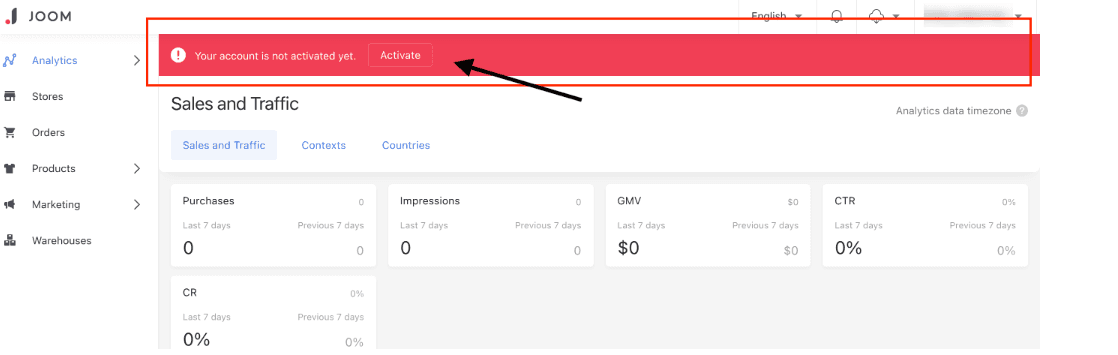
You must enter all the information that customers need to know on your seller account from the "Settings" tab. If your account is not properly activated and any information is missing, you will see red exclamation marks in the settings section.
You must provide the return address. You must add your payment details. Joom pays sellers in USD twice a month via Payoneer. Then, you must remember to click the "Save" button.
3. Learn about the platform's main rules and regulations
The platform has main rules and regulations. You should research these thoroughly. For example, you should learn about Joom customs duty details. At the same time, you should know the most sold products on the platform. Joom stands out in categories such as shoes, dresses, and electronics.
4. Verify your branded products
If you sell branded products, you must verify your products. You must go to the "Documents" tab. Then, you must specify the type of trademark authorization. That is, you must click the "Add document" button and select the trademark authorization type. Then, you must not forget to press the save button.
5. Prepare your store in detail
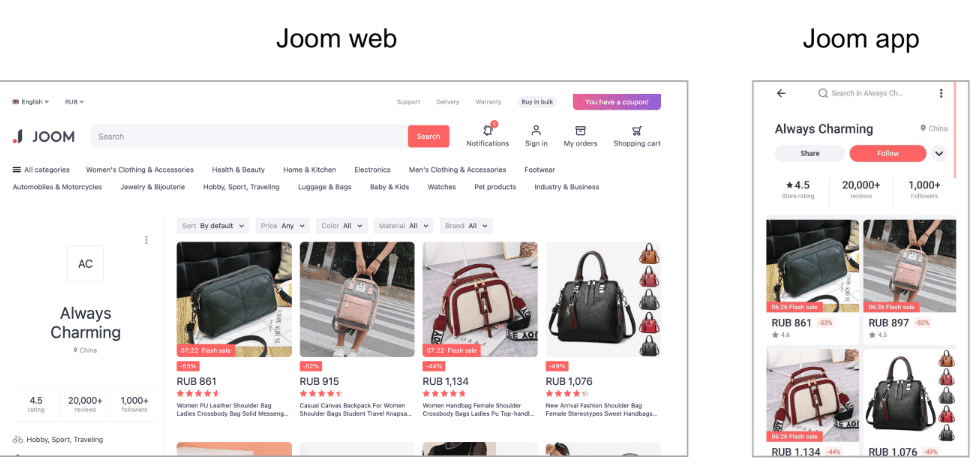
You are allowed to open only one store containing 500 products. Stores on Joom represent storage areas used to display and manage your products on the platform. Also, you are allowed to have only one account on the platform. People with multiple accounts are deemed to be violating the platform rules.
If your store is blocked by Joom, you cannot open a store again within 6 months. To open a store, you must go to the "Seller panel" tab. Then, you must click the "Stores" button. From here, you must select "Open new store."
6. Upload your products
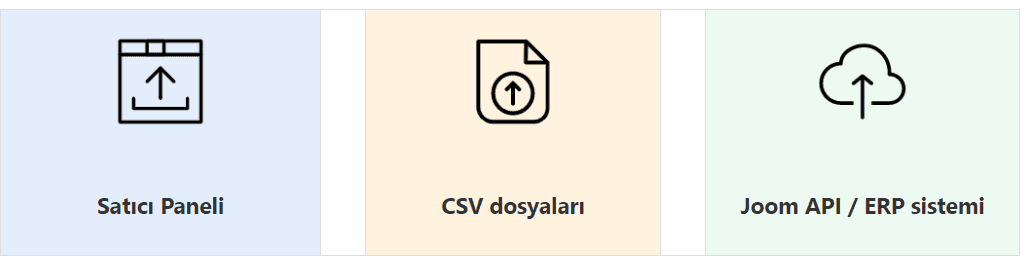
You must upload your products to your store. You also need to wait until the product passes inspection. It is recommended to upload products that will meet customers' needs. Thus, you can get the maximum benefit from sales.
7. Set allowed countries and prices
You must set the product price and shipping price in detail. In addition, you must set the shipping price according to countries. You should strive for maximum efficiency in logistics processes.
8. Promote and sell your products
You should start marketing or promoting your products. This way, you can start selling quickly. You have the chance to participate in promotional activities through Joom Ads. Then, you must quickly prepare and send the orders to your customers.
Let Navlungo Carry Your Joom Shipments!
Navlungo allows you to save time and costs on your international shipments. In addition, you have the chance to deliver your products to more than 130 countries. First, you need to set up the shipping integration of your Joom store. This way, your orders fall into the Navlungo panel.
Consequently, you can keep customer satisfaction and loyalty at the highest level by providing quick responses to orders. So, how can you integrate your Joom store into Navlungo?
• You must go to the "My Integrations" tab in your Navlungo panel.
• You must click the "Marketplace" button.
• You must say "Add new marketplace" and select the Joom platform from the marketplaces that appear.
• Do not forget to add your store link and name.
• Then, you must accept the store connection approval.
• After adding your billing information as well, your store will proceed linked with Navlungo.

Can You Shop on Joom from Turkey?
Joom is one of the frequently preferred shopping sites in Turkey. Used by many people worldwide, the application appeals to a broad audience. In other words, it is possible to shop from Turkey on the platform. However, it is beneficial to check the customs duty information of the country you live in.
Also, the site has many users from Turkey. In addition, returning the products you bought from the platform is quite simple. It is sufficient to contact customer service. Afterwards, the customer service team will inform you of the necessary steps.